how-to-export-audio-in-reaper
theme-replacer-build-your-own-hybrid-reaper-theme
how-to-reduce-latency-in-reaper
change-waveform-size
should-you-delete-reapeaks-files
reaper-dark-mode-on-windows
reapertips-theme-complete-guide
what-happened-to-reaper-in-a-year
massive-update-to-regions-and-markers-in-reaper-v7-62-kh9kg
instantly-phase-align-audio-in-reaper
quickest-way-to-add-icons-to-your-tracks
quickest-way-to-color-tracks-items-in-reaper
the-theme-adjuster-for-reaper-7-a-comprehensive-guide
how-to-share-a-reaper-project-with-someone
how-to-convert-drums-to-midi-in-reaper
instantly-convert-audio-to-midi-in-reaper
how-to-export-import-reaper-settings
best-utility-scripts-in-reaper
the-proper-way-to-save-projects-in-reaper-7
how-to-insert-midi-notes-in-one-click-in-reaper
best-midi-settings-for-reaper-s-midi-editor
best-settings-for-reaper-7
practice-your-timing-with-midi-rhythm-trainer-for-reaper
why-reaper-is-not-saving-your-project-settings
how-to-stop-reaper-from-looping-items
split-midi-items-using-mouse-wheel-in-reaper
mind-blowing-midi-note-generator-in-reaper-midi-ex-machina
drum-racks-in-reaper
advanced-fx-browsing-in-reaper
reaper-7
global-scale-tool-in-reaper-let-it-key
5-useful-scale-tools-in-reaper
4-ways-to-get-minimal-in-reaper
how-to-recreate-a-guitar-noise-gate-plugin-in-reaper
best-free-plugins-for-reaper-tukan-studios
how-to-separate-tracks-in-the-mixer
how-to-tweak-any-reaper-theme
js-lava-reverb-amazing-free-shimmer-reverb
how-i-record-guitars-quick-and-easy-in-reaper
5-tips-for-getting-started-in-reaper
create-save-and-load-layouts-in-reaper
customize-the-look-of-your-midi-notes-in-reaper
copy-and-replace-midi-note-sections-in-reaper
quick-way-to-go-through-takes-in-reaper
pan-tracks-using-track-name
amazing-free-denoiser-in-reaper
easy-seamless-loop-using-second-pass-render-in-reaper
reverse-midi-trick-in-reaper
a-guide-to-automation-items-in-reaper
a-trick-to-expand-and-collapse-toolbars-in-reaper
10-automation-shortcuts-in-reaper
how-to-auto-color-in-reaper
quick-way-to-check-your-levels
select-item-without-cursor-moving
how-to-stack-regions-in-reaper
5-ways-to-display-audio-in-reaper
identify-scales
js-nostalgizer
reaper-fix-files
how-to-export-backup-reaper
how-to-merge-midi-in-reaper
layer-sounds-in-one-track-in-reaper
easy-way-to-navigate-big-projects
how-to-install-multiple-reapers
how-to-strum-midi-notes
10-tips-for-writing-midi-drums-in-reaper
how-to-add-borders-to-toolbar-icons-in-reaper-6
easiest-way-to-update-reaper
show-fx-list-inside-tracks-in-reaper
smoother-waveforms-and-meters-in-reaper
how-to-copy-and-paste-velocities-in-reaper-b
quickly-test-different-tempos-in-reaper
allow-drag-import-to-insert-new-tracks
duplicate-tracks-with-no-items
js-droplets
how-to-add-gradients-in-reaper
reaper-v6-72-tons-of-new-track-group-features
how-to-clean-your-fx-list-in-reaper-8
retrospective-midi-recording
6-ways-to-lower-cpu-load-in-reaper
6-metronome-tips-in-reaper
a-trick-to-quickly-loop-items-in-reaper
how-to-reorder-midi-notes-in-reaper
how-to-fully-collapse-folders
easy-audio-stutter-in-reaper
easy-clean-up-project-folders
open-project-folder-in-one-click
change-grid-size-with-your-mouse-wheel
reaper-v6-71
quickest-way-to-pan-tracks
how-to-set-midi-velocity-shortcuts
create-shortcuts-to-your-plugins
5-advanced-ways-to-edit-in-reaper
how-to-show-plugin-ui-inside-your-tracks
how-to-show-vu-meters-on-tracks
6-things-i-wish-i-knew-when-i-started-using-reaper
how-to-stretch-midi-notes
how-to-duplicate-tracks-without-items
a-tool-for-customizing-reaper-6-theme
using-the-master-playback-rate-to-set-tempo

Theme Replacer: Build Your Own Hybrid REAPER Theme

March 27, 2026

If you've ever tried to manually swap image files in a REAPER theme, you know how tedious it gets. You need multiple browser windows open, you're dragging and dropping files, renaming things, then activating the theme in REAPER, refreshing it, and repeating the whole process over and over. It's a lot.

Theme Replacer is a desktop app by Digitt that takes care of all of that for you 💪

🎨 What it does

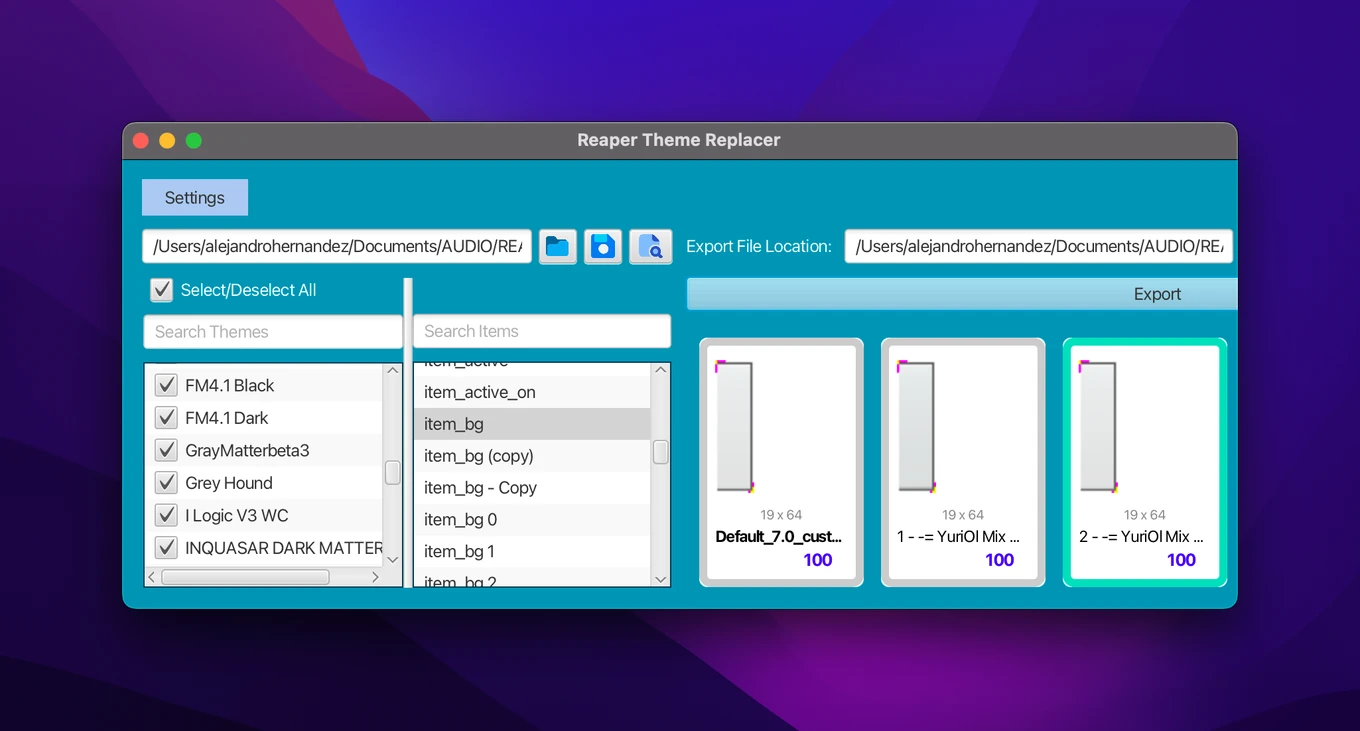
Theme Replacer lets you browse the image files across multiple themes at the same time, compare them side by side, and export any of them into your target theme with a single click. No unzipping themes, no manual file copying, no folder hunting.

You can also enable auto-export, which automatically pushes the selected image into your theme every time you click on an item. Pair that with Digitt's included refresh script and you'll see the changes update in REAPER in real time.

It works on MacOS, Windows, and Linux.
🛠️ How to set it up

  1. Download a few themes from stash.reaper.fm and add them to your REAPER color themes folder.
  2. Download Theme Replacer from Digitt's Ko-Fi page (link below). You'll get the app, a refresh script, and a user guide.
  3. Install the app. On Mac, you'll likely need to allow it in System Settings > Privacy & Security the first time.
  4. Open Theme Replacer and click the folder icon to select your REAPER color themes folder, then save it.
  5. Set your export file location by selecting the theme you want to edit (for example, Default 7).
💡
The app automatically creates a backup copy of your theme with _custom added to the name. Your original file stays untouched.

🔄 Browsing and exporting images

Once everything is set up, you'll see all your themes listed on the left. Check or uncheck any of them to show or hide them. On the right, you'll see a list of all the image files. Use the search bar to find specific elements like "mute", "effects", or "volume knob".

Click an image name to see how it looks across all your themes side by side, then use the arrow keys to cycle through them. Once you find one you like, hit Export.

⚠️
Some themes only include images for specific scalings (100%, 150%, 200%). If you're running REAPER at 150% or 200% and the source theme only has 100% assets, the replaced image might not show up. Enable Show only matching sizes in Settings to filter out incompatible options.

👁️ Seeing changes in REAPER

You have a couple of options for previewing your changes:

  • Activate theme on export: REAPER automatically switches to your custom theme after each export.
  • Auto-export + refresh script: The smoother option for browsing quickly. Copy Digitt's refresh script (Digitt's Reaper Theme Mixer - Refresh Script.lua) to your REAPER scripts folder, then load it via Actions > Load ReaScript... and run it. While the script is active, Theme Replacer will push changes to REAPER automatically. Note that there's about a 1.5 second delay by design, so the theme doesn't refresh constantly.
💡
TIP: The refresh script is a toggle. Run it once to start, run it again to stop. Turn it off when you're done editing.

💰 Where to get it

Theme Replacer costs $15 and is available on Digitt's Ko-Fi page.

Hope you enjoy! 💙

Hai there!

I'm Alejandro, and I created this ad-free page to give you the best experience learning REAPER.

If you find my work helpful, please consider buying me a coffee. That'd help me cover the costs of this site and gives me more time to create free resources.

Buy me a coffee ♥
Buy me a coffee
View comments